
Uses Guide For Relx Device and Pods
RELX Device Guide
RELX Device Quick Start GuideAll models · Pods · Power modes · Model comparisonEveryday use for every model01
Charge firstPlug in the USB-C cable. The light blinks during charging and goes steady or switches off once the battery is full.02
Insert podPeel off the silicone seals and drop the pod in place; the magnets click it into position.03
Start vapingTake a gentle draw and it activates. There is no fire button at all.04
Replace podSwap to a fresh pod once the flavour fades or tastes burnt.05
Indicator lightTells you the battery level and charging status with one glance.
Compare the modelsCustomizableRELX Infinity 2Three power levels · Quick charging · Uses Pro 2 PodsSpecial featureAdjustable power modesEco — 5.5W · Lighter vapour, longest battery lifeSmooth — 6.5W · The everyday middle settingBoost — 8W · Fuller hit, larger clouds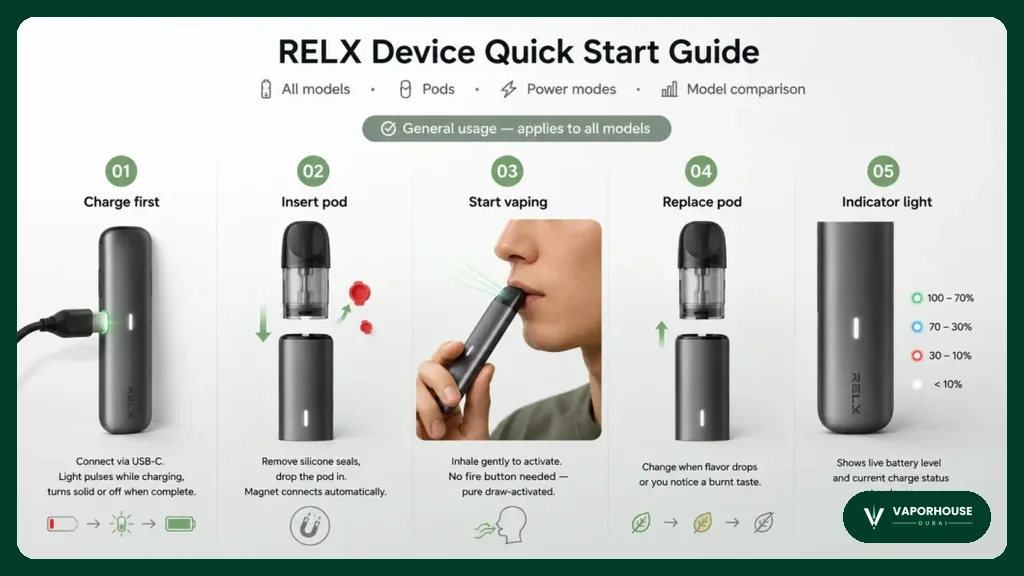
Compare the modelsCustomizableRELX Infinity 2Three power levels · Quick charging · Uses Pro 2 PodsSpecial featureAdjustable power modesEco — 5.5W · Lighter vapour, longest battery lifeSmooth — 6.5W · The everyday middle settingBoost — 8W · Fuller hit, larger clouds
- One press of the side button moves to the next mode
- The colour of the light tells you the active level
- Designed around RELX Pro 2 Pods
- Wrapped in premium European leather
- Same button-free, draw-to-start system
- Takes RELX Pro Pods
- A dressed-up shell over the internals shared with the Infinity
- Slim, light body with a grippy texture
- 350mAh battery, charged over USB-C
- Fixed 6W output that starts when you draw; no setup
- The lowest-cost entry into RELX